
Best USB Fans for Office: Stay Cool While Avoiding Work
Let’s be real—offices never hit that perfect temperature. The AC fights the sun, and there’s always that weird corner with stale air. USB fans are lifesavers. These tiny gadgets plug right into a USB port and squeeze onto any desk, quietly doing their thing.
They’re lightweight, easy to move, and don’t hog precious outlets. Most just perch on your desk or clip to a shelf—no tripping over cords or rearranging the whole office. Sure, they won’t cool down an entire room, but they’re a game-changer when you’re glued to a screen and need a breeze.
When you’re picking a USB fan, a few things matter. Size and noise level come first—nobody wants to sound like they’re calling from a wind tunnel. Build quality is surprisingly important. Flimsy fans tip over or break if you so much as bump them. Adjustable speeds and flexible necks let you aim the breeze exactly where you want. We spent a ridiculous amount of time testing the popular models to find the USB fans that actually make office life less sweaty.
Best USB Fans for Office
Is it just us, or does office AC always feel like a prank? When waving a folder isn’t cutting it, USB fans are our secret weapon. We’ve rounded up our favorites to keep us cool and maybe even look a little more professional (or at least less sweaty than the printer).
Gaiatop USB Desk Fan

If you want a fan that cools you off without hogging desk space, this little blue one is a top pick.
Pros
- Easy to move and fits anywhere
- Quiet even when cranked up
- Offers three breezy speed choices
Cons
- On/off button is electronic, not a manual switch
- Only rotates vertically, not left/right
- Needs to stay plugged in—no battery option
When we dropped the Gaiatop USB Desk Fan on our crowded office table, nothing rolled away and our snacks stayed put. It barely takes up space—think chunky smartphone size. The plastic feels sturdy, not flimsy, so we didn’t worry about it falling apart if we got a little too enthusiastic with the mail.
Testing all three speeds was oddly fun. On low, you can still hear yourself think. On high, your papers might try to escape. The fan stays relatively whisper-quiet, so no engine noise during Zoom. It’s light enough to move between work station and kitchen (because, let’s face it, making toast gets hot).
The electronic touch button on the back took a second to find, especially before coffee. And since it needs to stay plugged in, if you wander off with your laptop, the fan’s stuck behind, loyally blowing air at nobody. Still, for the price and size, it’s a solid win for keeping your workspace cool and your mood steady.
Gaiatop USB Desk Fan

If you want strong airflow without blasting your eardrums or electricity bill, this fan is a solid pick.
Pros
- Powerful breeze in a compact size
- Runs whisper-quiet at all speeds
- Adjusts easily to your preferred angle
Cons
- Needs USB power, so no batteries or wall plug
- Only available in a few basic colors
- The cord is long, but not endless
Honestly, we rarely agree on office temperature, so having our own Gaiatop USB Fan has saved us from a few thermostat battles. It fits perfectly on our cluttered desks, which is no small feat.
The first time we switched it on, we didn’t expect such strong airflow from such a tiny gadget. On the lowest setting, it’s a gentle breeze; crank it up, and it’s basically a wind tunnel for your face.
It’s impressively silent. The motor keeps a low profile, so you don’t have to shout over it or explain to coworkers why your papers are blowing away. The fan tilts to aim right at you, whether you’re hunched over a spreadsheet or leaning back dreaming about lunch.
You do have to keep it near a USB outlet—no batteries, no wall plug. The cable is long enough for most desks, but you can’t wander far. For a fan that’s tiny, strong, and doesn’t sound like a jet engine, we’re impressed. If someone ever figures out how to settle the office thermostat war, let us know—until then, at least we’ll stay cool.
Koonie Mini USB Desk Fan
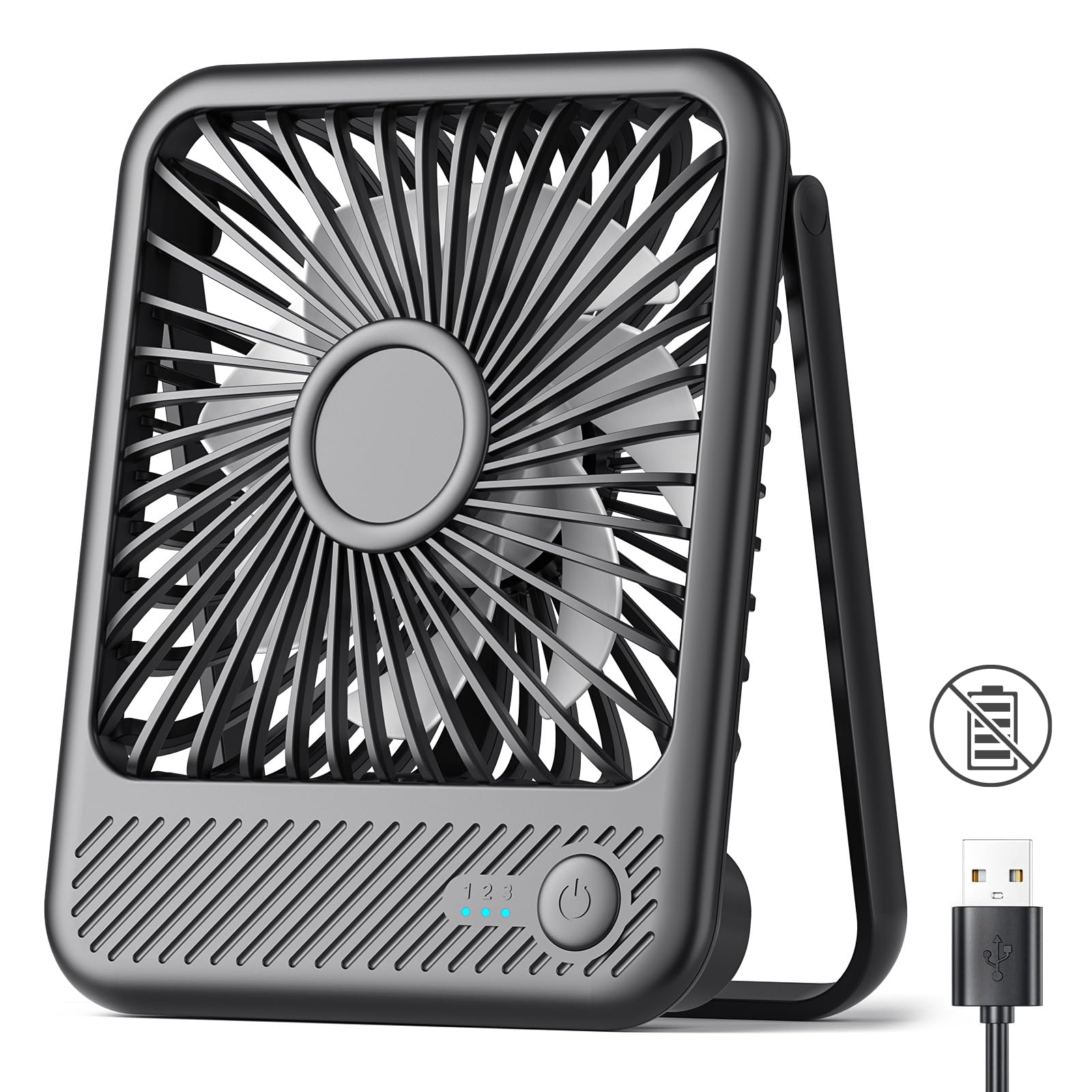
If you want a tiny desk fan that actually moves air but doesn’t drown out your thoughts, this Koonie does the trick—just don’t expect to use it away from a plug.
Pros
- Folds up and fits in even the most crowded office setups
- Quiet enough that everyone forgets it’s there—until they want to borrow it
- Adjustable tilt makes us feel like wind (direction) gods
Cons
- Needs to be plugged in at all times
- No battery, so portability is close to zero
- Short base doesn’t always stay steady if we get wild with the airflow angle
This little black fan somehow manages to almost disappear into even the messiest desk jungles. When we need to cool down fast during Zoom marathons, it cranks out enough breeze to rustle our sticky notes—without blowing away the whole stack.
The three speed settings are easy to switch with just a push. Our favorite part? It’s so quiet that people only notice it’s on when their hair starts waving.
We love how compact it is—it squeezes between our monitor, coffee mug, and abandoned lunch without needing a reservation. The tilt lets us aim the breeze right where we want, which, let’s be honest, is straight at our faces every afternoon. The folding design means it’s easy to pack for travel if you ever need to take your chill on the road.
But let’s get real: this fan only works when plugged in. We kept forgetting that, and once tried to take it to a meeting—no luck unless we found a USB port. As long as you accept its corded fate, it’s a handy fix for sticky office afternoons. If you’re okay plugging in, the Koonie Mini USB Desk Fan brings more chill to your day than most coworkers manage all year.
Diveblues TurboBreeze USB Desk Fan
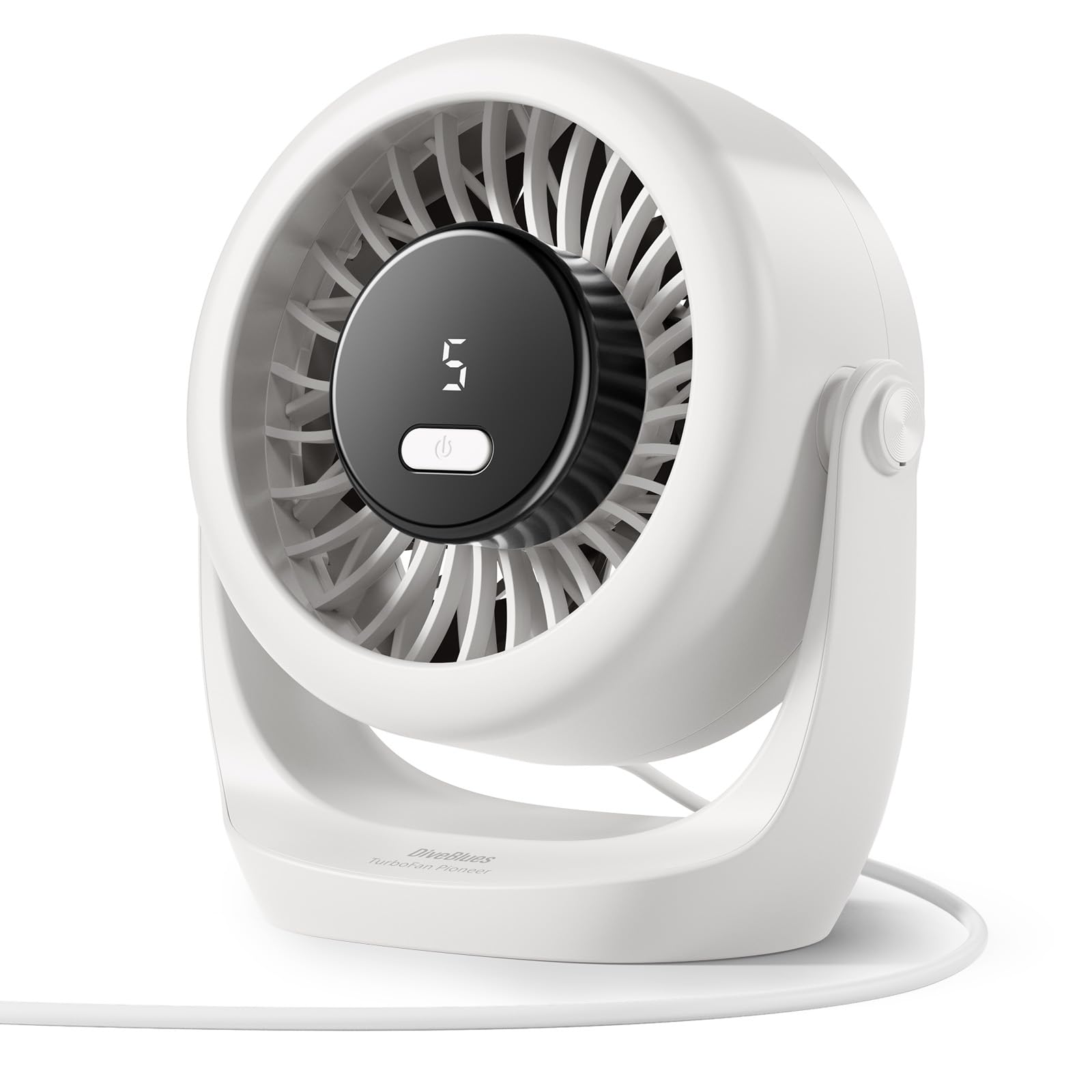
If you want a little fan that makes your desk feel like a wind tunnel but without the racket, this quirky powerhouse deserves a real look.
Pros
- Impressively strong breeze for its size
- Almost silent on the lower settings
- Swivels to point air wherever you want
Cons
- Can hog a lot of USB power at startup
- Highest speed isn’t exactly whisper-quiet
- Small footprint means it’s easy to knock over
We’ve all suffered in stuffy offices, refusing to admit we need another gadget on the desk. The Diveblues TurboBreeze barely takes up space—about the size of a grapefruit (yes, we checked). It packs a surprising amount of wind power. Even on low, it cools quickly, and you don’t need to go full tornado unless you want to look like you’re in a shampoo ad.
There’s a slick LED display for adjusting five different speeds, which makes us feel like tech geniuses just for running a fan. The 360° adjustment is a nice touch. You can aim it right at your face or spin it around to cool your laptop or, honestly, your snack pile.
The compact design fits in between paperwork and your questionable coffee mug collection. Since there’s no battery, you just plug it into the nearest USB and go—unless your only open port is already battling with your phone, lamp, and stress-ball charger.
It’s not perfect, though. When we first plugged it in, it pulled enough power to make our desk lamp flicker (not haunted, just dramatic). On top speed, it’s more “office white noise generator” than “whisper-quiet,” but that’s a fair trade for a blast of cool air on a blazing day. If you’re as clumsy as we are, heads up: it’s easy to knock over when reaching for your phone—or your third cup of coffee.
If your desk needs a breeze and you want to look busy while staying cool, the Diveblues TurboBreeze has you covered.
BESKAR Small Clip-On Fan

If you’re tired of sweating through another boring meeting, this USB fan makes office life much cooler—seriously.
Pros
- The clamp holds on tighter than our last attempt at a diet.
- Very quiet; we can nap or Zoom in peace.
- Easily adjusts so our dramatic hair flips get prime airflow.
Cons
- Needs a USB plug, so forget about using it if we’re stuck with just wall outlets.
- On high, it’s a bit louder than we’d hoped if we’re going for spy-level silence.
- The airflow is focused—don’t expect to chill the entire squad.
The BESKAR Small Clip-On Fan brought actual fresh air to our desks. Its compact size squeezed right in among our mountain of paperwork without complaining.
That clip is strong—we tried shaking it loose, and it shrugged us off like a stubborn paperclip. We appreciate the low noise; even on high speed, conversations aren’t drowned out.
It’s easy to forget it’s there, except for the cool breeze. We rotated it every which way to keep up with our need to dramatically change positions.
We did wish we could unplug it and take it everywhere like a pet hamster, but alas, it runs only when plugged into a USB port. For its size, it pushes more air than the ancient AC in the break room.
If we could ask for anything more, maybe a “get rid of sweat patches in 2 seconds” button. For now, this BESKAR fan keeps us refreshed and our desk space drama-free.
TriPole Mini Desk Fan

If you want a powerful little breeze machine that fits anywhere and won’t empty your wallet, this is the fan to grab.
Pros
- Fits anywhere on our stuffed desktops
- Moves a surprising amount of air for its size
- Angle and speed are easy to adjust
Cons
- Only runs when plugged in—no battery freedom
- Gets fussy if the USB port is weak
- The tiny button can be tricky to press
We set this TriPole fan on our desk and instantly felt proof that good things come in small, breezy packages. With three speed settings, sometimes we cranked it up just to watch a sticky note flutter off and give us an excuse to move.
Our favorite feature is the 360-degree tilt—point it straight at our sweaty faces, or angle it to share the chill with the nearest coffee mug. At about the size of a donut (but much less delicious), it’s easy to slip it on the nightstand, toss it in a suitcase, or hide it behind a pile of paperwork.
The long USB cord means we don’t need to huddle next to our laptops like we’re around the last campfire in the office wilderness. We do run into a hitch or two: the fan refuses to work with some underperforming USB chargers, and there’s no battery backup.
Cleaning’s easy. The cover pops off so we can de-dust all those blades after a long week of spinning.
For anyone tired of melting under stuffy office lights, this is one compact sidekick with enough gumption to keep us cool and stop our coffee from turning into a hot spring spa.
EasyAcc USB Desk Fan

If you’re after a sturdy and super-quiet fan for your workstation that won’t hog desk space or electricity, this one checks almost every box.
Pros
- Compact and fits on even our cluttered desks
- Practically whispers while running—barely any noise
- Uses so little power we feel like energy-saving heroes
Cons
- Can’t use unless there’s a USB plug nearby
- Only has two speed settings
- The design doesn’t let it pivot side-to-side automatically
Plugging this fan in for the first time, we realized just how much we love silence—and a breeze. The brushless motor really does the trick, giving us solid airflow with almost no humming.
Despite its strong breeze, the fan didn’t budge or slide around. The soft silicone feet are no joke; they take their anti-slip job seriously.
That metal frame also looks classy, so our taste level is preserved, even while sweating deadlines. It fits just as well on a cluttered corner as it does on a stylish shelf.
We quickly noticed one hiccup—there’s no battery, so no luck if we try to use it outdoors or in a blackout. We did appreciate the two speed choices, so whether we need just a gentle waft or feel like we’re melting, it delivers.
And bonus: our electricity bills won’t make us cry, since this thing draws almost zero power.
SWEETFULL 6.5″ USB Desk Fan

If biting heat at your desk makes you a grump, this USB fan keeps us cool, quiet, and looking sharp without taking up much space.
Pros
- Whisper-quiet even at high speed
- Rotates any direction we want—no more weird arm angles
- Snazzy wood grain base fits our “fancy office” dreams
Cons
- Shakes a tiny bit unless we weigh it down or tilt it just right
- Does not come with a plug adapter (so hold onto your cubes)
- The 6.5″ size includes the knobs, so the actual fan is smaller than expected
For folks who despise sweating during Zoom calls, the SWEETFULL fan has been a life-saver on our desks. We can barely hear it running, even cranked to the max, which is ideal when we’re pretending to pay attention in meetings.
Adjusting the fan up, down, or sideways is smooth as butter, and we appreciate that we can aim the breeze anywhere—even into the snack drawer. We love how this thing actually looks good with its wood grain base.
For once, it doesn’t scream “cheap plastic!” It slides into small spaces without hogging desk real estate, perfect for crowded cubicles or our already chaotic home setups.
The long USB cable lets us connect wherever needed, so we’re not hunched over like gremlins next to a plug. While everything is mostly positive, there are a few quirks.
The fan wobbles a little on full blast if we don’t park something heavy next to it or angle it down. Also, the so-called “6.5 inch” measurement is a bit of an overstatement—don’t expect a wind tunnel.
It doesn’t include an adapter cube, so we scavenge one from our old phone chargers or just plug it straight into the laptop. Dusting the blades is a breeze—literally, with the cover popping off for easy cleaning.
TriPole Mini USB Desk Fan

If you need a small but mighty breeze machine that takes up about as much space as a sandwich, this one checks the boxes for us.
Pros
- Good airflow for its tiny size
- Three speeds keep us cool no matter the mood
- Light enough to toss in a bag or move around easily
Cons
- Needs to stay plugged in to run
- No wall charger in the box (USB cord only)
- Small fan might not chill a big room
We plugged in the TriPole Mini USB Desk Fan at our desk and almost forgot it was there—until we felt the surprising gust of air. For something that looks more like a toy than a fan, the airflow can actually ruffle papers if you’re not careful.
We kept ours on the lowest setting most of the day and that alone kept us comfy, even during our most dramatic spreadsheet battles. Changing settings is pretty simple; just tap the back button to pick from three speeds.
When we needed max power after a brisk walk to the office, the highest setting cooled us down fast. The base sits steady and quiet, so there’s no annoying rattling when we’re trying to focus (or nap during lunch).
Someone clearly thought about desk clutter because this thing doesn’t hog space. We appreciated being able to swivel the head around, aiming the breeze directly at our sweaty foreheads—or, let’s be honest, at the snacks we forgot to put back in the fridge.
Just remember, it needs a USB port to work, and don’t expect it to blast cold air across the whole room—this one is built for personal space only.
SmartDevil Mini USB Desk Fan

If we want real desk-chilling power without lugging around a wind turbine, this fan should make it onto our shortlist.
Pros
- Incredibly lightweight—fits in one hand or a very roomy pocket
- Quiet enough so we don’t annoy our coworkers (or ourselves)
- Three speed settings offer just enough control for picky people
Cons
- Cord could use a growth spurt (it’s a bit short)
- Needs to be plugged in—no battery fun here
- Small size means it won’t cool an entire room
We’ve used the SmartDevil Mini USB Desk Fan, and at barely 6 ounces, it’s so light we sometimes worry it might blow away instead of us. Setting it up on the desk takes almost no effort, and before we know it, there’s a fresh breeze hitting our faces—without rattling like an old truck.
Let’s just say our coffee isn’t the only thing keeping us refreshed now. With three speed settings, this fan gives us options without making life complicated.
Whether we’re barely awake and just need a gentle puff, or the office AC has apparently given up, we can crank this up and actually feel it. We’ve tried spinning the head to direct the air—thanks to the 360-degree rotation, it goes wherever we want.
Our paperwork, however, now lives in fear. One thing to note, though: the cord is somewhat short, so it has to live near the laptop or power bank.
And while the size is perfect for personal use, don’t expect it to turn our cubicle into an arctic tundra. Still, when the countdown to summer heat starts, we’re happy this little navy blue lifesaver is in the lineup.
Buying Guide
Let’s be honest: picking a USB fan shouldn’t be rocket science. Still, nobody wants a wimpy breeze or a desk tornado.
So, what should we actually look for?
Noise Level: We all love a gentle breeze, but not if it sounds like a jet taking off next to our coffee mug. Quieter fans are best for peaceful work.
Fan Size: Smaller fans fit snugly on our messy desks. Larger ones make more wind but take up more space—maybe less room for snacks.
Adjustable Angles & Speed: We don’t want a fan that only points at our elbows. Look for models that tilt or have flexible necks, and definitely get one with speed settings.
That way, we’re not stuck with just “off” and “mini hurricane.”
Power Source: USB fans usually plug into laptops or power banks. Make sure the cable isn’t so short that our only option is to crawl under the desk.
Key Features to Consider
| Feature | Why It Matters |
|---|---|
| Noise Level | Keeps us focused |
| Adjustable Angles | Blows air where we need it |
| Speed Settings | Customizes airflow |
| Size | Fits our workspace |
| Cable Length | Prevents cable limbo |
| Durability | Lasts longer—even if we drop it |
When we shop, let’s focus on practical features that make our workday cooler. Maybe we’ll even have a little less drama.
Frequently Asked Questions
We all want cool air without loud noise or flying paper. Cost, power, and noise levels matter just as much as keeping our desks from turning into a wind tunnel.
Who knew airflow could be so hilarious? What’s the mightiest mini USB fan to tame my office’s tropical climate?
Let’s face it, our air conditioning is about as reliable as our office coffee. For strong airflow, look for fans with at least three blades and a high RPM—over 3000 is solid.
Some of us swear by the OPOLAR USB Desk Fan. It can move a surprising amount of air for its small size.
It won’t blow us out of our chairs, but it’ll take the edge off that oppressive humidity.
Can I trust a USB desk fan not to bail on me during an all-nighter, or will it ghost me like my last Tinder date?
We’ve all had gear quit on us, but most modern USB desk fans use brushless motors. That means less friction and more durability.
A good USB fan should easily run for hours without quitting. Pick a fan with solid reviews on longevity if you want to avoid those sad, lonely, sweaty nights.
How can I find a USB fan that won’t be noisier than my boss on a Monday morning?
For peace and quiet, look for fans labeled “quiet operation” or promising a noise level under 40 decibels. Metal fans tend to be noisier than plastic ones, so if you want silence, stick to plastic.
The Arctic Breeze USB Fan is a solid choice if you value low noise. It hums along quietly—unlike our boss announcing a morning meeting.
What’s the ideal USB fan that won’t blow my papers away like it’s auditioning for ‘Twister 2’?
Some of us just need a gentle breeze that won’t send sticky notes flying. Go for fans with adjustable speeds so you can dial the airflow down before it reboots your filing system.
Fans with smaller blades or fan cages that direct air more narrowly can help protect paperwork from a paper tornado.
In the epic saga of desk gadgets, which USB fan will keep me cool without making my wallet weep?
Not every cool gadget has to be pricey. Plenty of solid USB fans cost less than a lunch at our favorite sandwich shop.
Stick to trusted brands with good reviews. Spending $15–$25 often gets us a fan that lasts.
We don’t have to risk bankruptcy for a breeze.
Is a rechargeable USB fan the secret to surviving office heatwaves, or just a cool story, bro?
Rechargeable fans let us escape to meetings or break rooms without leaving our cooling buddy behind.
Battery life varies, but we usually look for at least 4–6 hours per charge.
During power outages—or snack breaks in the kitchen—a rechargeable model can be pretty handy.
If we’re parked at our desk all day, though, a standard USB fan still does the job.