Best Fans with Remote Control That’ll Keep You Cool (and Lazy)
Fans are a trusty way to keep us cool when the weather heats up. But honestly, nobody wants to get up and cross the room just to turn one off or change the speed.
That’s where fans with remote control come in. These gadgets let us change the settings with a push of a button—perfect for those lazy days when moving even a few steps feels like a chore.
We love that these fans come in all shapes and sizes, from tall tower models to small desk fans. Some even throw in timers, oscillation, and night modes, so we can fine-tune our cooling experience without leaving our spot on the couch.
Plus, having a remote means we don’t have to play “guess the setting” in the dark. No more knocking over drinks just to reach awkward buttons.
When picking the right fan, we have to think about things like the size of the room and how loud the fan gets. It’s also worth asking: is the remote easy to use, or does it vanish forever in the couch cushions?
And cleaning—ugh, nobody wants a fan so dusty it could knit a sweater. We spent hours comparing and testing popular models to find the best fans with remote control that make staying cool almost effortless.
Best Fans with Remote Control
Let’s be honest—most of us love cool air, but getting up to adjust the fan is not our favorite workout. That’s why we’ve rounded up the best fans with remote control to help us stay chill without leaving our spot.
Our favorite part? These fans keep us comfortable while our laziness stays on full display.
Amazon Basics 16″ Pedestal Fan with Remote

If we want an easy, no-fuss way to keep our rooms cool without having to stand up every five minutes, this sturdy remote-controlled fan is a smart pick.
Pros
- Remote lets us change settings from our comfy spots.
- Runs pretty quietly, even on the highest speed.
- Adjustable height and tilt—let’s aim it right where we need.
Cons
- Assembly tries to test our patience (and possibly our relationship).
- Fan base isn’t the heaviest, so don’t let your toddler wrestle it.
- Not cordless, so outlet location still rules the setup.
When we finally set this fan up, we couldn’t help but celebrate the remote control. Walking across the room just to change speeds or modes? Not a chance—we’re way too comfortable for that.
We were surprised at how much air this thing pushes out, and it still managed not to sound like a helicopter taking off in the living room. The dual blades keep the air moving, and the room felt a lot less stuffy in minutes.
Late at night, the sleep mode is our favorite. It doesn’t roar or whine; it just keeps the air gentle and steady while we try to sleep through our neighbors’ karaoke sessions.
Assembly made us laugh—let’s just say, the instructions take a back seat while you make your best guess. Once it’s up, though, we love that the fan head tilts and the height adjusts.
No more fighting over the perfect angle; everyone (even the dog) gets a breeze! If you’re seeking a budget-friendly fan that covers the basics and adds a remote for pure laziness, we think Amazon Basics 16″ Pedestal Fan fits right into our homes—next to our favorite chairs, of course.
Lasko Pedestal Fan with Remote

If we want straightforward cool comfort in large rooms without any fuss, this fan makes a strong case for itself.
Pros
- Remote is simple and works from across the room
- Adjustable height and tilt make aiming the breeze effortless
- Really quiet, so we don’t have to shout over it
Cons
- Plastic build feels a bit flimsy compared to heavier fans
- Remote can’t control oscillation, just power/speed/timer
- Could be a little bulky for tiny spaces
A remote-controlled fan that actually makes us feel cooler from the couch—yes, please. We barely had to get up, which is our favorite way to experience air movement.
With only a few button presses, we could flip through three speeds, set the timer, or just pretend to be fancier than we are. It’s massive for a pedestal fan, but that’s not a bad thing in our book.
The airflow easily reached the far corners of our living room and the oscillation makes sure no one has to fight for the sweet spot. If you enjoy adjustable things as much as we do, you’ll appreciate how quickly we could raise or lower the height and tilt the head to direct the breeze right where it’s needed.
Assembly didn’t take a tool or a brain trust, and the weight is light enough that lugging it from room to room won’t pull a muscle. The one real gripe? The remote can’t make the fan swivel left or right, so we still have to waddle over if we want to adjust where it’s aiming.
At least while we’re up, cleaning the blades is a breeze (pun fully intended).
If you want cooling power you can control in your pajamas, the Lasko Pedestal Fan with Remote will absolutely do the trick.
Pelonis Tower Fan with Remote

If we’re tired of sweating in style, this fan is the quick fix we’ve been wishing for.
Pros
- Remote lets us change settings without leaving our comfy couch
- Impressively quiet—even quieter than our attempts at stealthy midnight snacking
- Simple assembly, even for those of us who fear instruction manuals
Cons
- Automatically shuts off without the timer, which leaves us suddenly in a warm room at 4 a.m.
- Oscillation could eventually give the cord a hard time—so, treat it gently
- Not a hurricane in a box; airflow is solid, but won’t knock over lamp shades
Once we got this Pelonis Tower Fan out of the box, setup took less than five minutes—faster than waiting for our coffee to cool. We just snapped the base together, popped the fan on, and plugged it in.
No sweat. With a tap on the remote, we cycled through three speeds and adjusted the oscillation.
That remote quickly became our favorite thing since delivery pizza. Noise? Hardly any.
At night, it’s as if the fan whispers us to sleep with a soft white noise soundtrack, not the usual roar we get from other fans. We actually got through a movie without turning up the volume—a win for our eardrums.
Space-wise, this tower fan fits next to our bed without hogging all the room. It’s light, so moving it from our bedroom to the living room for our daily afternoon chill session is no trouble.
The only thing we wish is that it didn’t sneakily turn off after several hours unless we remember the timer. That’s how we learned to read the instructions before napping on hot afternoons!
Dreo Smart Tower Fan

If we want a fan that actually listens when we shout at it (literally, thanks, Alexa), the Dreo Smart Tower Fan should be on our shortlist.
Pros
- Super quiet—it barely whispers even on higher speeds
- Remote, app, and voice controls—we’re spoiled for options
- Wide oscillation covers more of the room than our favorite blanket
Cons
- Requires occasional, deeply emotional Wi-Fi reconnections
- No built-in air cooler—just pure “fancy fan” energy
- Tall and sleek, but not exactly petite for tiny spaces
When we fired this up in the living room, it felt like a cool breeze snuck in and swept through the entire space. Its strongest wind settings blast air almost across the room—impressive for such a slender tower.
If we want to chill out on the couch and change mode without moving more than a finger, that’s exactly what the remote (or our smartphones) are for. Getting it working with Alexa and Google Home made us feel like we live in the future.
We just tell our smart speaker to cool us off, and—presto—the Dreo jumps to life. Even better, we can schedule it to turn off at night, so we don’t fight with our blanket at 3 a.m.
We’re big on peace and quiet, and this fan delivers in that department. It’s easy to forget it’s on, except we’re no longer sweating.
The only real annoyance: sometimes the Wi-Fi drops out, and we have to convince it to reconnect. Still, the convenience and comfort are worth the couple of minutes spent troubleshooting.
If we’re looking for an upgrade, the Dreo Smart Tower Fan is a solid choice with plenty of bells and whistles—and none of them are the noisy kind.
Lasko 16″ Stand Fan with Remote

If you’re ready to kick your feet up and command a cool breeze from across the room, this Lasko Stand Fan makes it pretty easy—remote included.
Pros
- Remote means you don’t have to get up just to change the speed.
- Height and tilt are adjustable for when you’re picky about airflow.
- Setup is simple; no screwdriver meltdown required.
Cons
- On high, it’s not whisper quiet—think soothing white noise or a distant jet.
- If you want super strong gusts, this fan might feel a bit tame.
- The plastic build doesn’t exactly scream “heirloom quality.”
Sometimes you just want to lie in bed and hit a button to keep the air moving—this fan lets you do that. There are three speed settings, and the auto-off timer saves energy if you tend to forget things while binge-watching your favorite shows.
Its oscillation spreads a nice breeze around the room, so nobody has to fight for the cool spot. Height adjustment is a breeze, and you can tilt the head up or down without needing to become a contortionist.
The remote feels satisfying to use. If you need background noise to help you sleep, the sound from this fan on high is just about right.
The plastic finish feels lightweight, but that pays off when you move it from the bedroom to the living room. Once in a while, the fan needs a quick wipe to stay looking fresh.
Assembly is so easy it almost builds itself, and you probably won’t break a sweat (which is kind of the point). If you want a no-fuss, reliable fan with a handy remote, this is a solid pick—even if it won’t win any beauty pageants.
Amazon Basics 40″ Tower Fan
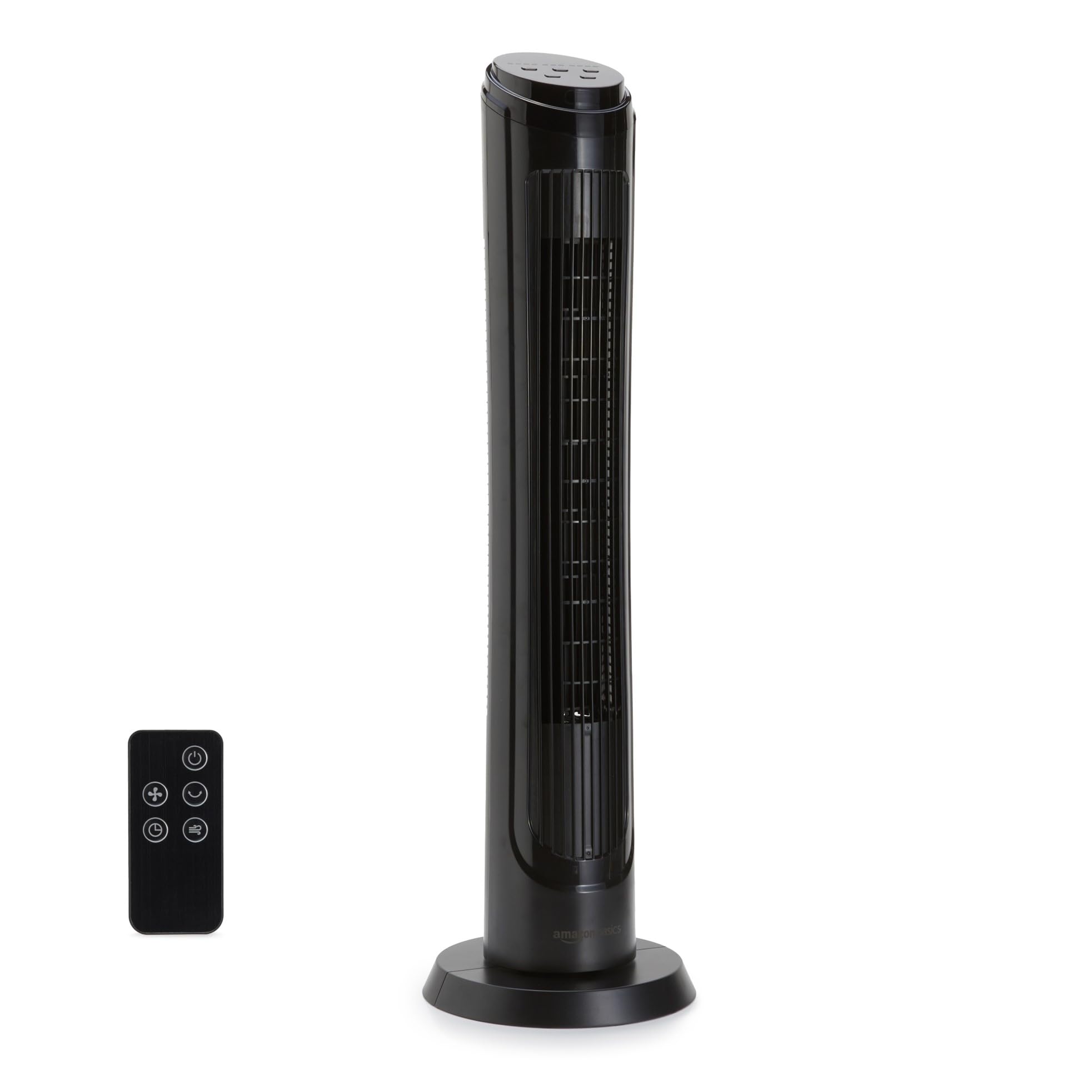
If you want easy cooling with minimal effort (seriously, remote control exists for a reason), this fan is a strong contender but not flawless.
Pros
- Remote lets you adjust settings from your blanket fort.
- Quiet operation on lower speeds means less drama during naps.
- Slim design fits next to your collection of unread books.
Cons
- Highest speed sounds like a small jet is taking off nearby.
- Remote is a bit basic (like the brand says).
- Assembly can include an awkward squeak at first.
We set this Amazon Basics tower fan up in our living room, squeezing it between the couch and a plant that’s barely hanging on. It didn’t hog space or clash with our questionable décor choices.
The digital controls on top were easy to figure out, and the remote felt like a magic wand for lazy afternoons. Oscillation gave a nice wide spread of air, so nobody in the room felt left out.
Three speeds let us ease into arctic chill mode or just take the edge off a warm day. On low, we could actually hear ourselves think; on high, we wondered if earplugs should be on our shopping list.
During the first five minutes, a weird squeak had us concerned, but it disappeared faster than our patience for summer heat. The build feels sturdy enough, but if you expect luxury or advanced tech, you’ll have to look elsewhere.
For everything else, it cooled us down—and our tempers—with a few simple clicks from the comfort of our couch.
Dreo Table Fan with Remote

If you want a fan that blows like a hurricane but won’t drown out your late-night snack sneaking, this is the one.
Pros
- Quiet enough that your pet goldfish remains undisturbed
- Remote lets you control the airflow without moving an inch
- Moves a shocking amount of air for such a small device
Cons
- Only four speed settings—sometimes you want five just to be picky
- The tilt adjustment is manual, not remote (no robot arms yet)
- Black finish collects dust like we collect coffee mugs
We set up the Dreo Table Fan right on our nightstand, and honestly, it’s smaller than most things we regret impulse buying. The airflow, though, is no joke.
We aimed it at the other side of the room and still got a decent breeze—socks were almost lost. The remote is a real game-changer because getting out of bed to adjust fan speed is now ancient history.
On the lowest setting, it’s so quiet we sometimes check if we actually turned it on. Even at the highest speed, it’s less distracting than our neighbor’s midnight vacuuming habit.
The digital numbers turn off at night so it won’t act as an accidental nightlight. We did wish it had one more speed level—just for the principle of it—but the four we get handle most situations.
Cleaning is easy since the grille pops off, which is handy because it can pick up dust faster than we pick up takeout. And while it doesn’t have remote tilt, a quick nudge points it exactly where you want, like at your face after a workout or at the dog during his afternoon nap.
Lasko Space-Saving Pedestal Fan

This Lasko pedestal fan is a great pick if you’re tight on space but still want to stay cool without standing up every time you need to change the speed.
Pros
- Height makes it easy to enjoy a breeze while lounging on the couch or sprawled in bed
- Remote control handles everything—just point and click, even when you’re half asleep
- Super slim, fitting in corners and along walls without hogging up all your valuable real estate
Cons
- The remote can launch a disappearing act and get lost pretty easily
- Assembly is a bit of a workout for your patience
- Louvers might need a little fidgeting to point the air exactly where you want it
Setting up the Lasko Space-Saving Pedestal Fan required us to snap a few pieces together. Once that was done, our living room felt like a breezier, cooler place.
With three quiet speed settings, this fan keeps us cool without making us feel like we’re living in a wind tunnel. The fan is tall enough to blow directly over the bed, which means no more sweaty nights or fighting over who gets the air.
The remote control became our best friend almost instantly. Adjusting the fan speed or setting the timer from the comfort of our blanket fort felt downright luxurious.
There’s even a handy spot on the back of the fan for storing the remote, though let’s be real—sometimes one of us “misplaces” it for hours. The timer and sleep modes are clutch, especially when we don’t want to wake up in Antarctica.
It looks nice, doesn’t tower over the whole room, and has a safety plug for peace of mind. Sometimes the louvers need a gentle nudge to get the breeze just right, but we’ll gladly fidget if it means keeping cool all night.
If we must complain, putting the base together took longer than we’d like to admit. The breeze is worth every minute spent attaching bolts with one of us holding parts in place while the other muttered about “this better be worth it.” Spoiler: it was.
PNTCK 13″ Air Circulator Fan with Remote

If you want a compact fan that brings plenty of power (and lets you be lazy with a remote), this one deserves a spot on your desk.
Pros
- Tiny but mighty – Moves a ton of air for its size
- Whisper-quiet, even at night – Perfect for light sleepers
- Super easy to carry – Lightweight with a handle
Cons
- Not cordless so your cord-hating dreams are dashed
- Sometimes it feels a bit too breezy on the highest mode
- The remote and fan didn’t match the instruction pictures, so there’s a mystery vibe
We all dream of keeping cool without having to leave our chair or couch. With the PNTCK 13″ Fan, you barely have to lift a finger.
The remote is a true lifesaver—you can change speeds, set a timer, or adjust oscillation while staying glued to your gaming chair or hiding under the sheets. Who knew waging a battle against the summer heat could be so easy… and so lazy?
Its size is another win. We’ve hauled it from the living room to the bedroom (and even the office on one of those “hide from our coworkers” days).
It only weighs a couple of pounds, but packs a punch that genuinely moves air across a room. The 120° tilt and 90° side-to-side swing are great for keeping everyone cool, even during heated family game nights.
We wish it could run free of the cord, but hey, we win some, we lose some. The fan’s highest speed almost knocked over our stack of napkins—a little dramatic for a table fan!
While we did a double-take with the instructions not matching our actual remote, at least the controls were still easy enough to use without summoning a search party. If your goal is an easy-to-move, super-quiet, and surprisingly strong portable fan with the coveted remote, our money’s on this PNTCK 13″ Air Circulator Fan.
Just be ready to keep track of yet another remote!
LPHUMEX Fan Remote Kit

If you’re after an easy ceiling fan upgrade and don’t want to mess with a bunch of wires, this kit makes it simple.
Pros
- Installs without taking off the whole fan
- Reliable remote signal—works from another room
- Fit works with most major fan brands
Cons
- Won’t hide in smaller fan housings
- Lacks a fan reverse button
- Drywall anchors for the wall holder aren’t included
Let’s be honest, nobody enjoys standing on a chair every time they want to turn on the fan or fiddle with the speed.
We tried the LPHUMEX Fan Remote Kit. After only a little grumbling during the wiring bit, we had it working above our heads in no time.
The remote looks sleek sitting in its cradle. There’s no guessing—just three big buttons for the fan speeds and a light toggle.
Glorious laziness, activated.
Remote range is way better than we expected. We pressed the remote from the hallway and—magic—the fan obeyed!
No more stumbling back into bed after turning things off either.
We really enjoyed the freedom of not having to bother with those old pull chains.
There were a couple of hiccups though. The receiver is chunkier than our previous remote kit, so squeezing it into some fan housings was a no-go.
We also had to dig around for extra drywall anchors for the wall cradle since they’re not in the box.
If you’re looking for simple, wireless control and don’t mind a minor extra trip to the hardware store, LPHUMEX Fan Remote Kit makes upgrading any compatible ceiling fan a breeze.
Buying Guide
When we’re picking out the “perfect” fan with remote control, we want something that cools us down, not just collects dust. And we’re not just talking about the remote!
Key Features to Look For
- Remote Range: Because the last thing we want is to get up just to change the speed.
- Speeds and Modes: More speeds usually mean more comfort. Look for fans with at least three speed settings.
- Oscillation: Fans that swing back and forth can cool more of the room. Bonus points if they do a full spin—our lazy side appreciates it!
- Timer: Fans with timers let us pretend we’re energy efficient, even when we accidentally nap for three hours.
- Noise Level: We like our sleep. A quiet fan helps us not wake up every time it decides to change speeds.
Here’s a quick table to help us keep track:
| Feature | Why It Matters | What To Consider |
|---|---|---|
| Remote Range | Stay seated, stay happy | 10+ feet is ideal |
| Speed Settings | Customizes airflow | At least 3 speeds |
| Oscillation | More area coverage | Wide angle preferred |
| Timer | Saves energy (and money) | 1-8 hours is common |
| Noise Level | Quieter fans = better sleep | Under 55 dB is nice |
Let’s keep our cool and make sure we’re not buying a fan that only our dogs can hear.
We’ll want something sturdy, easy to clean, and maybe stylish—because if it’s going to sit in our living room, it should at least look good doing it!
Frequently Asked Questions
Remote-controlled fans help us stay comfortable without leaving our seats.
These fans offer features like adjustable speeds, lighting, and easy setup that add convenience to our lives.
How do I avoid getting up to adjust my fan speed, like some kind of non-royal peasant?
We simply grab the remote and press a button—no need to disturb our royal lounging.
Some remotes come with dedicated buttons for each speed, so switching from a gentle breeze to hurricane mode is extra easy.
Some models even remember our favorite settings.
Can ceiling fans with fancy remote controls also enlighten my dark room with lights?
Yes, many ceiling fans with remotes let us control both the fan and built-in lights.
With these, we can turn on the fan and brighten up the room without ever leaving our blanket burrito.
Look for models that offer dimmer controls for the lights, too.
What makes a living room fan with a remote the couch potato’s dream appliance?
We don’t have to interrupt our movie marathon to change the breeze.
The remote lets us adjust speed, direction, and sometimes even set a timer—all while staying horizontal.
We become true champions of relaxation and convenience.
Wouldn’t it be ‘cool’ if your bedroom fan listened to your remote’s every whisper for a breeze?
Some remotes work from anywhere in the room, so we can tweak the fan settings without shouting commands or waving the remote around.
Advanced versions use infrared or radio frequency for even better range.
That means our fan listens better than most siblings.
What’s the point of a stand fan with a remote if it can’t bring me snacks too?
While our fan can’t fetch snacks, it can make fetching them more pleasant by keeping us cool during the trek to the kitchen.
We’d have to settle for remote airflow control rather than remote snack control—until scientists solve the snack-delivery problem.
Does fitting a remote control kit to a ceiling fan make it more intelligent or just lazy?
We like to think it makes our ceiling fan more user-friendly, not lazy. Adding a remote kit gives us more control without climbing ladders or fumbling with pull chains.
It’s a smart upgrade, especially for those of us who value convenience over gym memberships.